Why script it
A games site needs footage, and footage goes stale. Every time a game changes, the clips should change with it. Recording by hand means setting up the same moment again, hiding the same debug panels, and cropping the same way, which is exactly the kind of chore that never gets done. So we wanted recording to be a command anyone, or anything, could rerun.
Churn already had half of this. Its screenshot tool opens a page in headless Chrome and drives it over the DevTools protocol, the same protocol the browser's developer tools use, with nothing installed beyond Node itself. It talks to Chrome with Node's built-in WebSocket and has no dependencies at all. The tool now lives in Baker Engine, our shared engine, where Churn, Spellbox, and this site can all use it.
Two kinds of footage
Some things can be filmed one frame at a time. Our mascot's idle animation is a pure function of time, so the page can freeze its clock at any moment, draw exactly that frame, and hand it back. That's how Loaf is rendered: 90 identical frames every run, however slow the machine.
A real game can't be paused into a film strip. Churn runs its tournament in a Web Worker, Spellbox runs a fixed 60 Hz simulation, and both are full of timers. Freezing one clock would desync everything else. Gameplay has to be recorded live.
Screencast frames, with their timestamps
Chrome's DevTools protocol has a screencast: after Page.startScreencast, the browser sends a JPEG every time the page paints, each with a timestamp, and waits for an acknowledgment before sending more. Our tool saves each frame as it arrives and keeps its timestamp.
The timestamps matter more than the frames. Headless Chrome draws WebGL in software (SwiftShader), so frames don't arrive on a steady beat. In the Churn battle above, the median gap between frames was 32 ms, about 31 frames per second, but some gaps stretched to 265 ms while the renderer caught up. A screen that isn't changing sends no frames at all: one quiet stretch of a spectated game had a 2.4-second gap. Played back at a fixed rate, all of that would stutter and drift.
So instead of guessing a frame rate, the tool writes a list for ffmpeg's concat demuxer that gives every frame its true duration:
file '0000.jpg'
duration 0.0367
file '0001.jpg'
duration 0.0298
...
ffmpeg plays each frame for exactly as long as it was on screen, then resamples to a steady 30 frames per second. Motion comes out at real speed, even though the recording machine was struggling.
The bug we found writing this
While pulling those numbers for this post, a few frame durations came out negative. The screencast occasionally delivers frames slightly out of order, and the list was built in arrival order. ffmpeg tolerated it, so the clips looked fine, but it was wrong. The fix was one line: sort the frames by capture time before writing the list.
// Screencast frames can arrive slightly out of order; list them by capture time.
const ordered = [...frames].sort((a, b) => a.at - b.at)
Playing the game from a script
Footage of a title screen sells nothing. The tool takes a list of steps (wait, click, drag, press a key, hold a key, run some JavaScript, start or stop recording), so a script can actually play. This is the Spellbox fight on our homepage:
node tools/shot.ts devCombat.html "" "" --size 1600x900 \
  --do wait:3500 --do "eval:document.getElementById('dev-overlay').style.display='none'" \
  --do record:shots/spellbox \
  --do key:1 --do key:4 --do key:Space --do wait:4000 \
  --do key:2 --do key:5 --do key:Space --do wait:4000 \
  --do key:1 --do key:3 --do key:Space --do wait:4000 --do stop
Runes 1 and 4 make a Fireball and 2 and 5 a Frost Nova, and the last presses ended in a Frost Beam, which crit and chilled the goblin on this take. Recording starts without blocking, so key presses happen while frames are captured, and stop ends it. Overworld clips use hold:d,1800 to walk the wizard to the right for 1.8 seconds.
For Churn we didn't need to play at all. The game ships developer pages for testing, and one of them, the skirmish lab, can set up any battle from a preset. The "armory" preset puts every tier-3 weapon on the board and starts the fight on its own.
Hiding the debug panels
Developer pages come with developer clutter: seed pickers, stat readouts, consoles. One eval step hides them before recording starts. Except the first recordings still opened on the panel, because the screencast had already buffered a few frames painted before the panel disappeared.
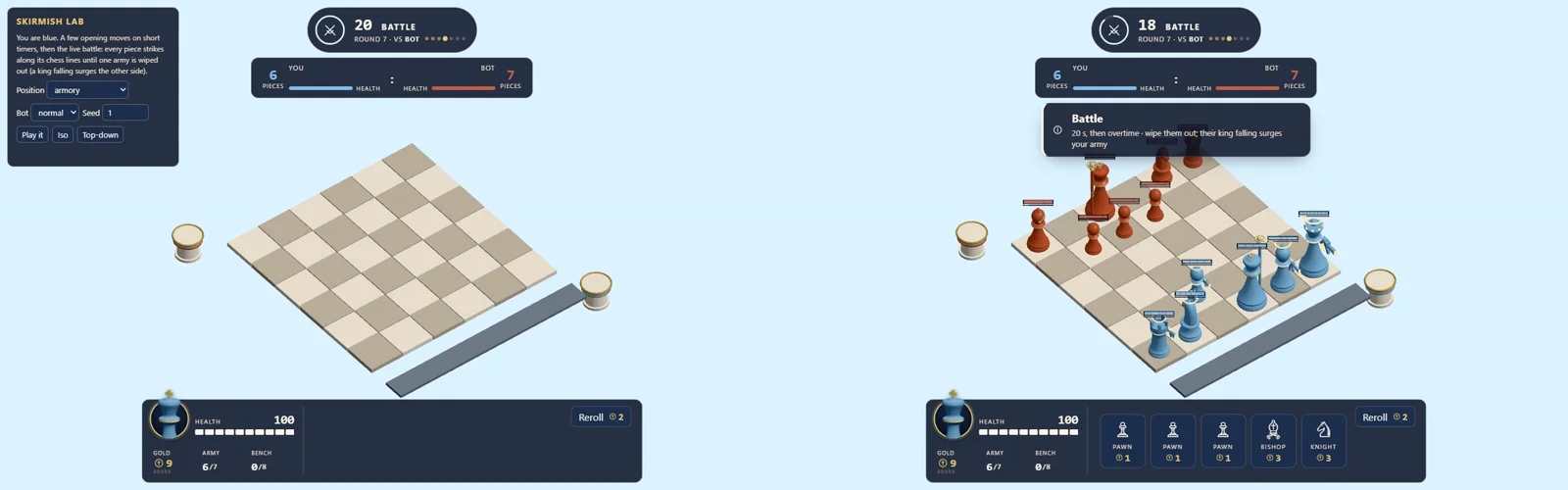
The fix was to trim, not to fight the buffer. ffmpeg skips the first 1.8 seconds of the Churn clip and the first quarter-second of Spellbox's. We check the first frame of every clip before it ships, because that's also the poster frame some browsers show.
Shipping the clips
Clips are H.264 MP4s at 960 pixels wide, with no audio and the index at the front of the file, so they start playing before they finish downloading. Our two gameplay clips are 363 and 395 KB. For comparison, the SteamMap GIF we started with was 1.09 MB for five seconds at 400 pixels; the same five seconds as MP4 is 51 KB.
On the page, clips are muted and looped, and they only play while they're on screen. With reduced motion turned on in your system settings, they don't autoplay at all.
Next
Since recording is a command, it can run whenever a game ships. The obvious next step is wiring it into each game's release checklist, so the clips on this site always show the game you'll actually get.